How to Set Up A Smart Home From Scratch In 2026
Buying Guides
By Oliver Hayes

'%3E%3Crect%20width%3D'14'%20height%3D'14'%20fill%3D'%23ffffff'%2F%3E%3Cline%20x1%3D'0'%20y1%3D'0'%20x2%3D'0'%20y2%3D'14'%20stroke%3D'%23111111'%20stroke-width%3D'1.5'%2F%3E%3C%2Fpattern%3E%3C%2Fdefs%3E%3Crect%20width%3D'100%25'%20height%3D'100%25'%20fill%3D'url(%23diag)'%2F%3E%3C%2Fsvg%3E)
Smart homes have finally reached the point where they make sense for normal people.
Five years ago, building a smart home often meant juggling multiple apps, compatibility headaches, and devices that randomly stopped talking to each other. In 2026, things are much simpler thanks to Matter support, better voice assistants, and smarter automation platforms.
If you're wondering how to set up a smart home from scratch in 2026, the biggest mistake you can make is buying gadgets before building a plan.
We've tested dozens of smart home products, and the best setups aren't necessarily the most expensive. They're the ones that solve everyday problems without creating new ones.
Here's exactly how we'd build a smart home from the ground up today.
Step 1: Choose Your Smart Home Ecosystem First
Before buying a single light bulb or security camera, pick your ecosystem.
This decision determines how everything works together.
Best Ecosystems in 2026
Ecosystem | Best For |
|---|---|
Apple Home | Privacy-focused iPhone users |
Google Home | Android users and AI-powered automation |
Amazon Alexa | Broadest compatibility and easiest setup |
Home Assistant | Power users and advanced automation |
For most people, Amazon Alexa or Google Home remain the easiest starting points.
Matter compatibility has improved dramatically, meaning devices from different brands can finally work together without as much frustration.
Our recommendation: Pick the ecosystem that already matches your smartphone.
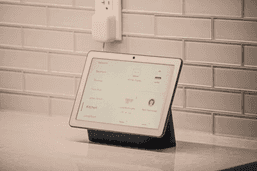
Step 2: Start With a Smart Home Hub
Think of this as the brain of your setup.
While many devices work independently, a hub creates a central control point for automation, routines, and voice commands.
Amazon Echo Hub
Price: $179.99
Standout Feature: Wall-mounted dashboard for managing your entire home.
Google Nest Hub Max
Price: $229.99
Standout Feature: Deep integration with Google's Gemini-powered smart home features.


Apple HomePod (2nd Generation)
Price: $299.00
Standout Feature: Local processing for many smart home functions.
Step 3: Upgrade Your Lighting First
Smart lighting delivers the biggest "wow" factor for the least effort.
No wiring. No renovations.
Just install, connect, automate.
Philips Hue Starter Kit: 4 E26 smart bulbs (75 W)
Price: $131.99
Standout Feature: Exceptional reliability and compatibility across nearly every ecosystem.
Step 4: Add Smart Plugs Before Replacing Appliances
Here's a trick many beginners miss:
You don't need to replace everything.
A smart plug can instantly upgrade lamps, coffee makers, fans, and other devices.


TP-Link Kasa Smart Plug Mini
Price: $29.99 (2-Pack)
Standout Feature: Energy monitoring and Matter support.
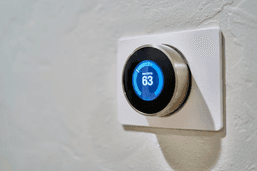
Step 5: Install a Smart Thermostat
If your home supports one, this is where convenience meets savings.
Modern thermostats can learn occupancy patterns and automatically optimize heating and cooling schedules.
Google Nest Learning Thermostat (4th Gen)
Price: $239.99
Standout Feature: Learn your routine and adjust temperatures automatically.
Step 6: Build Your Home Security Layer
Once lighting and automation are working, security becomes the next logical upgrade.
Ring Battery Video Doorbell Pro (2nd Gen)
Price: $249.99
Standout Feature: 4K video recording and enhanced zoom capabilities.
Arlo Pro 5S
Price: $229.99
Standout Feature: Strong smart detection features and flexible installation.
Step 7: Create Automations Instead of Collecting Gadgets
This is where smart homes become truly useful.
The goal isn't controlling devices from your phone.
The goal is needing your phone less often.
Useful Starter Automations
Good Morning
Bedroom lights brighten gradually
Thermostat adjusts temperature
Coffee maker powers on
Leaving Home
Lights turn off
Doors lock
Security system arms
Movie Night
Living room lights dim
Blinds close
TV powers on
The best smart homes disappear into the background.
You shouldn't have to think about them.
Common Mistakes to Avoid
Buying Too Much Too Fast
Many first-time users fill their homes with gadgets before understanding what problems they're solving.
Start small and expand gradually. Community feedback consistently highlights overbuying as one of the biggest smart home mistakes.
Ignoring Compatibility
Matter has improved things significantly, but checking compatibility before purchasing is still essential.
Using Too Many Apps
If every device requires its own app, your smart home becomes harder to use.
Centralize everything under a single ecosystem whenever possible.
Final Verdict
If you're building a smart home from scratch in 2026, don't start with fancy gadgets.
Start with a plan.
A smart speaker or hub, quality lighting, a few smart plugs, and a security device will provide more real-world value than filling your house with dozens of disconnected products.
The biggest trend in smart homes today isn't adding more devices.
It's making the devices you already own work together intelligently. And thanks to Matter, AI-powered assistants, and better automation tools, that's finally becoming achievable for everyone.

Oliver Hayes
Gadgets & Smart Home Writer
Oliver began writing about gaming and digital culture before moving into the world of consumer technology. He specializes in gadgets, smart home devices, and practical tech advice that helps readers make smarter buying decisions.