Best Laptop Docking Stations for The Home Office
Laptops
By Marwin Jaino Cervañez


A great laptop docking station is one of those upgrades you don’t appreciate until you’ve used one. One cable connects your laptop to monitors, Ethernet, storage drives, keyboards, webcams, and charging. Suddenly, your sleek ultraportable becomes a full-blown desktop workstation.
The problem? The docking station market is packed with overpriced hubs pretending to be docks and enterprise-focused models that most home office users simply don't need.
After evaluating today's best options, these are the best laptop docking stations for the home office in 2026, whether you're running a MacBook, a Windows ultrabook, or a powerful workstation laptop.
Quick Comparison Table
Docking Station | Connection | Power Delivery | Ports | Best For | Price (USD) |
|---|---|---|---|---|---|
CalDigit TS5 Plus | Thunderbolt 5 | 140W | 20 | Best Overall | $499.99 |
Anker Prime TB5 Dock | Thunderbolt 5 | 140W | 14 | Power Users | $399.99 |
CalDigit TS4 | Thunderbolt 4 | 98W | 18 | Mac & PC Users | $379.99 |
Plugable TBT4-UDZ | Thunderbolt 4 | 98W | 16 | Multi-Monitor Setups | $269.95 |
Dell WD22TB4 | Thunderbolt 4 | Up to 130W (Dell) | 12 | Business Laptops | $299.99 |
Kensington SD7100T5 EQ Pro | Thunderbolt 5 | 140W | 19 | Creators & Professionals | $449.99 |
Best Laptop Docking Stations for The Home Office
1. CalDigit TS5 Plus: Best Overall Docking Station
Price: $499.99
Standout Feature
20 ports with Thunderbolt 5 connectivity and 140W laptop charging.
Pros
Massive port selection
Future-proof Thunderbolt 5 support
Excellent display support
Premium aluminum build
140W charging handles workstation laptops
Cons
Expensive
Overkill for casual users
Detailed Review
Image: CalDigit
CalDigit has dominated the docking station space for years, and the TS5 Plus feels like the natural evolution of the legendary TS4. With 20 ports and support for the latest Thunderbolt 5 standard, it’s the closest thing to a desktop motherboard sitting on your desk.
For professionals working with multiple displays, external SSDs, video editing projects, or large datasets, the TS5 Plus removes nearly every connectivity bottleneck. Thunderbolt 5 bandwidth and 140W charging make it especially attractive for power-hungry laptops. Recent testing from multiple reviewers consistently ranks it among the most capable docks available today.
2. Anker Prime TB5 Dock: Best for Power Users
Price: $399.99
Standout Feature
Integrated GaN power supply with 140W charging.
Pros
Excellent charging performance
Compact footprint
Premium build quality
Thunderbolt 5 support
Fast storage connectivity
Cons
Fewer ports than CalDigit
Premium price
Detailed Review
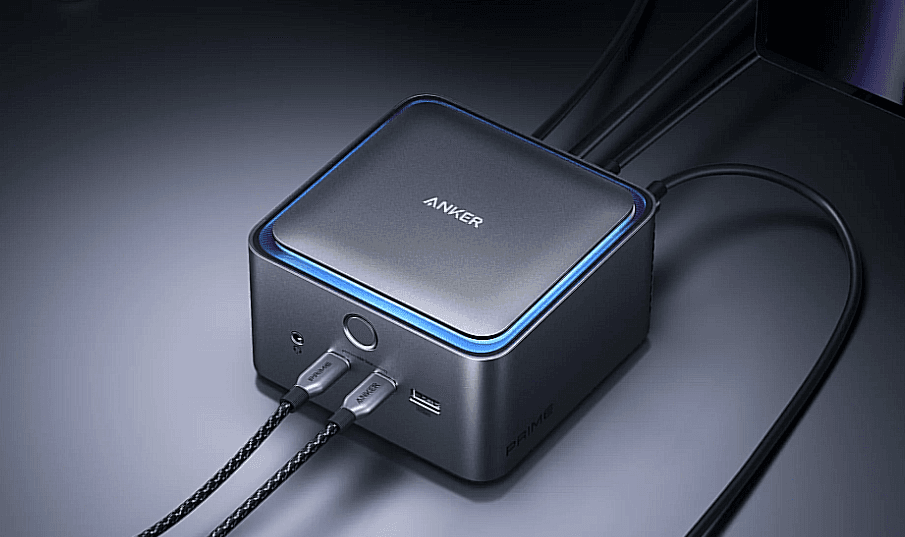
Image: Anker
Anker's first Thunderbolt 5 dock impressed reviewers with its built-in power supply design, eliminating the giant external power brick found on many competing docks. It supports up to 140W charging and dual 8K displays while offering 14 ports for peripherals, networking, and storage.
For creators running external SSD arrays or professionals managing multiple displays, the Prime TB5 delivers impressive bandwidth while maintaining Anker's reputation for user-friendly hardware.


3. CalDigit TS4: Best Thunderbolt 4 Dock
Price: $379.99
Standout Feature
18 ports with unmatched reliability.
Pros
Outstanding port selection
Excellent compatibility
Rock-solid reliability
Great for Mac and Windows
98W charging
Cons
Thunderbolt 4 only
Similar price to some newer TB5 docks
Detailed Review
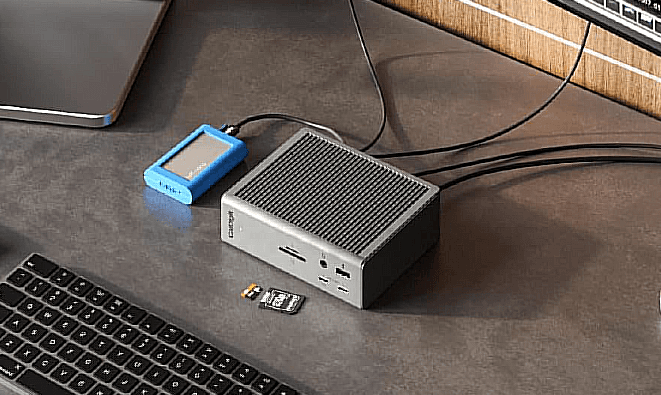
Image: CalDigit
Even in 2026, the TS4 remains the benchmark for Thunderbolt 4 docks. With 18 ports, 98W charging, 2.5Gb Ethernet, SD card readers, and multiple USB connections, it covers virtually every home office need. Many reviewers still consider it the best all-around dock because of its stability and compatibility.
Unless you're pushing multiple 8K displays or demanding workstation workloads, the TS4 remains incredibly easy to recommend.
4. Plugable TBT4-UDZ: Best for Multi-Monitor Workstations
Price: $269.95
Standout Feature
Outstanding display flexibility.
Pros
Supports multiple monitor configurations
Excellent value
Broad compatibility
Plenty of USB ports
Cons
Industrial-looking design
Less premium construction
Detailed Review
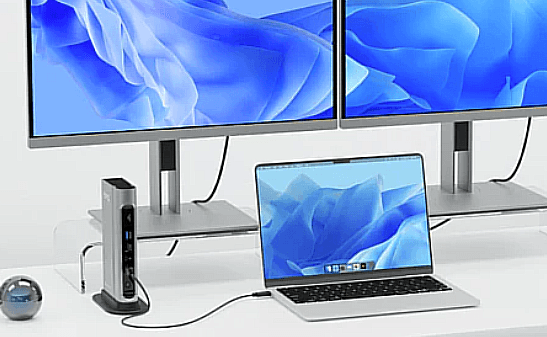
Image: Plugable
Plugable has become a favorite among remote workers because its docks prioritize practical functionality over flashy design. The TBT4-UDZ offers 16 ports, Thunderbolt 4 support, and excellent display flexibility, making it particularly appealing for productivity-focused users.
Writers, analysts, developers, and financial professionals will appreciate its ability to handle large multi-monitor setups without fuss.


5. Dell WD22TB4: Best for Business Laptops
Price: $299.99
Standout Feature
Excellent enterprise compatibility.
Pros
Reliable business-focused design
Firmware management support
Great with Dell laptops
Strong charging capabilities
Cons
Not as many ports as premium competitors
Less attractive design
Detailed Review
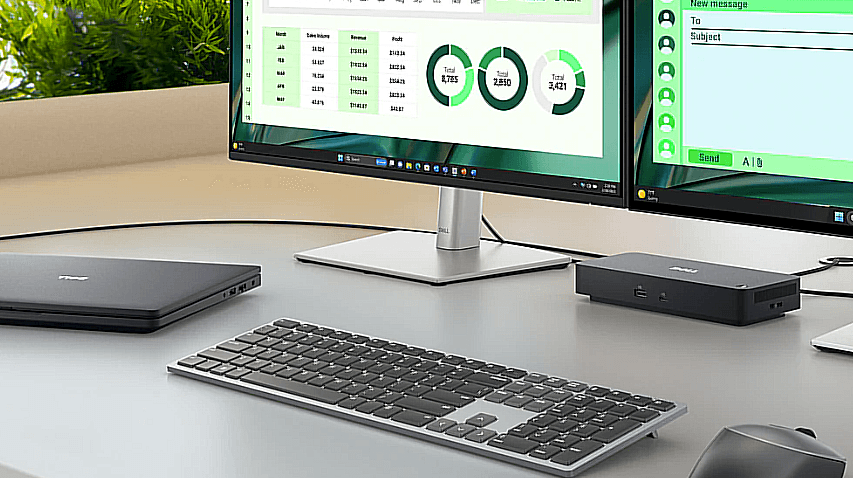
Image: Dell
The WD22TB4 is less exciting than consumer-focused docks, but that's exactly why many businesses love it. It emphasizes compatibility, firmware support, stability, and charging performance over flashy features. Enterprise environments continue to deploy it widely because it simply works.
If your work laptop is Dell-branded, few docks integrate as seamlessly.
6. Kensington SD7100T5 EQ Pro: Best Premium Professional Dock
Price: $449.99
Standout Feature
Built-in PCIe SSD expansion slot.
Pros
Thunderbolt 5 performance
19 ports
SSD expansion support
Excellent display capabilities
Sustainable construction
Cons
Expensive
Thunderbolt 5 laptops still aren't common
Detailed Review

Image: Kensington
Kensington took a different approach by integrating an SSD expansion slot directly into the dock. Combined with Thunderbolt 5 connectivity, 140W charging, and support for multiple high-resolution displays, it becomes a true workstation hub. Tech reviewers have praised its versatility, though its premium price means it's best suited to professionals who can actually leverage its advanced capabilities.
How to Choose the Right Docking Station
Choose Thunderbolt 5 If:
You own a Thunderbolt 5 laptop
You run multiple high-resolution displays
You use high-speed external storage regularly
You want maximum future-proofing
Choose Thunderbolt 4 If:
You primarily work from home
You run dual 4K displays
You want better value
Your laptop doesn't support Thunderbolt 5
Choose USB-C Only If:
You need basic expansion
You have a limited budget
You don't need multiple displays
Final Verdict
For most home office users, the CalDigit TS4 remains the sweet spot. It offers nearly everything professionals need without venturing into Thunderbolt 5 pricing territory.
If you're building a premium workstation that needs the latest connectivity standard, the CalDigit TS5 Plus is the clear winner. It delivers unmatched connectivity, future-proof performance, and enough ports to replace an entire desktop setup.
Our Picks
Best Overall: CalDigit TS5 PlusBest Value: Plugable TBT4-UDZBest for Power Users: Anker Prime TB5 DockBest for Business: Dell WD22TB4Best for Creators: Kensington SD7100T5 EQ Pro
If you’re also having a difficult time choosing a reliable laptop, look into our laptop articles.

Marwin Jaino Cervañez
Consumer Tech & Gaming Writer
Marwin started writing for a geek-news site before diving into video games. Still a geek by nature, delving into technology is inevitable. PCs, Laptops, Cellphones, Headphones, as long as he can game. Exploring low to high end models, he wants to see how far consuming tech has come for work and play.
Recent stories by Marwin Jaino Cervañez: